The ultimate visual
storytelling tool
XPression
Build stunning visuals and transform your data into compelling stories with the most powerful real-time motion graphics system on the market today.

Unleash your creative team
Every day, visual storytellers in news, sports, and live entertainment use XPression to enhance their stories and engage their viewers.
XPression equips your team with the tools to build on-brand, data-driven 2D & 3D graphics and animations and automatically composites them in any live video format, in real time.
Graphic solutions for every environment
Whether you need graphics for news, sports, entertainment, branding, live events, virtual sets, or augmented reality, there’s an XPression system that’s right for you.


Featured Case Study

Elevating the viewer experience with NBC Sports Regional Networks
Discover how NBC Sports Regional Networks are using XPression real-time motion graphics, PIERO sports analysis tools and Voyager virtual graphics engine to tell more compelling stories and enhance their studio shows.
Unlock the power
of XPression workflows
The power and functionality of XPression real-time motion graphics systems are limitless.
Our engine platforms and content tools allow you to completely customize your production workflow, for more effective and efficient graphic content creation.

Create more in less time
XPression’s super-templates, automated workflows, and real-time caching…

Scale, adapt and experiment at will
XPression handles it all: SD, HD, in SDI or IP, UHD/4K in Quad-Link or 12G Single-Link SDI…

Shorten the
learning curve
Clean UXs, logical menus, and familiar control interfaces make XPression tools fast to learn…

Tell better stories
With automated data integrations, unlimited graphic layers, and a totally…

Find the best creatives and animators
XPression is a widely accepted and globally used design tool with a rapidly…

Ongoing support
and training
We support our XPression users and designers with free monthly online training sessions and regular updates based on community feedback.
XPression engines and tools
Experience the full potential of software-defined graphics by choosing the XPression software that best aligns with your facility’s production requirements. Combined with one of our purpose-built XPression hardware engines you have an unmatched graphics system.
Software editions
XPression
Studio
XPression
BlueBox
XPression
Prime
XPression
Clips
XPression
Go!
Dynamic content creation solutions

MOS
Newsroom Tools
Manage and control graphics workflows within a newsroom system.

Display Content
Management
For driving pixel-accurate content across any large resolution monitor or display.

XPression Maps
Dynamic
Maps Content
Produce dynamic maps content with seamless integration into newsroom systems.

News Tickers &
Channel Branding
For channel tickers, branding and persistent data-driven informational graphics.

Data-Driven
Weather Graphics
For producing more engaging weather and climate content.

Touch and
Interactive Tools
For touchscreen integration and onscreen illustrations.
Hardware options
XPression real-time motion graphics engines are available in one, two, or four rack-unit (RU) frames to support productions of any size and complexity.

XPression 1RU & 2RU
Allows up to four channels (Video/Key) of 1080P real-time motion graphics in HD-SDI, SMPTE IP, and NDI™.
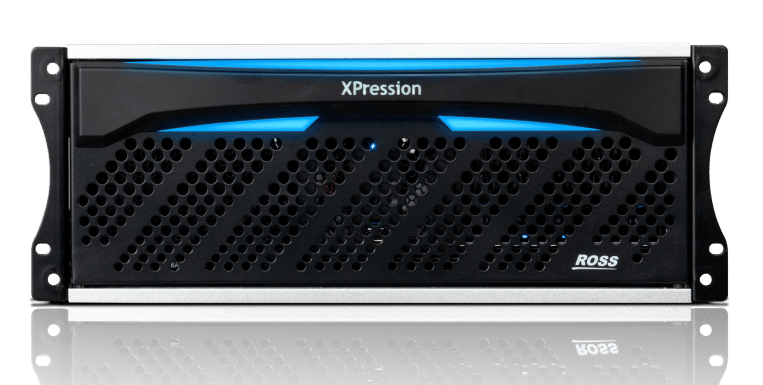
XPression 4RU
Designed for systems requiring AES, physical GPIs, and Longitudinal Time-Code input, the 4 RU platform supports HD-SDI, 12G, or IP transport signals, as well as 25G SFP cages (SFPs not included) for advanced video production in 1080P or UHD/4K.
Server platforms
XPression
Project Server
XPression
Gateway
XPression
Sequencer Gateway
XPression
INcoder
XPression
Remote Sequencer

Software upgrades
Discover the latest upgrades to the XPression Real-Time Motion Graphics System.

XPression training
Get the most out of your XPression software and workflows with our vast library of online tutorial content and our free online training sessions.

Rental partners
Learn more here
XPression marketplace
Learn more hereApplication Notes
- XPression DataLinq and Scoreboard Sources
- XPression Text Object Keyboard Shortcuts
- XPression Log Collector
- Using TeamViewer to Control XPression Remotely
- Configuring ENPS and XPression
- XPression Support for Chinese Text Input
- ActiveX NCS Plugin Installation
- XPression System Memory Upgrade for M4, M5, M6, and M7
- Ross Video XPression License Renewal Process
- XPression Go! Mini Blackmagic UltraStudio HD Mini Driver Install
- XPression Trial Edition
- Using XPression Effects with Avid Media Composer & NewsCutter
- XPression Layer Objects in v5.5 or Higher
- PBus on XPression
- Working with the New XPression Video Codec 2
- Converting an XPression License from a Dongle to a Software License
- Using Right to Left Languages in XPression
- XPression GO AJA IOXT & IO4K Install
- XPression Gateway Installation
- Sony ELC and XPression MOS Integration
- XPression License Tool and Software Maintenance
- XPression GO2 AJA IoX3 Driver Install
- XPression Automation Gateway by Rascular
- XPression Tessera One Software Settings Guide
- Multi-Project MOS Workflow
- XPression Anti-Virus Best Practices
- Exporting Clips from Adobe Creative Suite
Hardware Specifications
- XPN-HW-CORE-WKS-V3 XPression 1RU Core Workstation V3 Hardware Specs
- XPN-HW-CORE-PLUS-V3 XPression 1RU Core Plus V3 Hardware Specs
- XPression 1RU SDI Hardware Specs
- XPN-1RU-LL-M9 XPression 1RU SDI LL Hardware Specs
- XPression 1RU IP D25L Hardware Specs
- XPN-HW-CORE-V3 XPression 1RU Core V3 Hardware Specs
- XPression 1RU 12G Hardware Specs
- XPression 1RU NDI Hardware Specs
- XPression 2RU SDI Hardware Specs
- XPression 2RU IP D25L Hardware Specs
- XPression 2RU 12G Hardware Specs
- XPression 4RU IP Q25 Hardware Specs
- XPression 4RU 12G Hardware Specs
- XPression 4RU 12G LL Hardware Specs
- XPression 4RU SDI Hardware Specs
- XPression 4RU IP D25L Hardware Specs
- XPression Backlit Custom Keyboard Specs
- XPression Custom Keyboard Specs
- XPression GO2 Hardware Specs
Installation and Cabling Guides
- XPression 1RU Low Latency Cabling Guide
- XPression 1RU Core Plus V3 Cabling Guide
- XPression 1RU 12G Cabling Guide
- XPression 1RU NDI Cabling Guide
- XPression 1RU IP D25 Cabling Guide
- XPression 1RU SDI Engine Cabling Guide
- Ross GeminiIO 1RU Cabling Guide
- XPression 1RU Core V3 Cabling Guide
- XPression 2RU 12G Cabling Guide
- Ross GeminiIO 2RU Cabling Guide
- XPression 2RU IP D10 Cabling Guide
- XPression 2RU Chassis Install Guide
- XPression 2RU SDI Cabling Guide
- XPression 2RU IP D25 Cabling Guide
- XPression 4RU 12G LE5 Cabling Guide
- XPression 4RU IP Q25 Cabling Guide
- XPression 4RU SDI Cabling Guide
- XPression 4RU Chassis Install Guide
- XPression 4RU 12G Low Latency Cabling Guide
- XPression 4RU IP D25 Cabling Guide
- Motion Graphics System 1RU Chassis Install Guide
Release Notes
Software Installation Guides
User Guides
- XPression Clips Workflow User Guide
- XPression INcoder User Guide
- XPression Tessera User Guide
- XPression User Guide
- XPression Asset Cache Server User Guide
- XPression Distributed Workflow User Guide
- XPression Project Server User Guide
- XPression Desktop Preview Server User Guide
- XPression Status Client User Guide
- XPression Monitor User Guide
- XPression Touch Factory User Guide
- XPression Clips User Guide
- XPression Telestrate User Guide
XPression Maps
- Configuring XPression Maps to Use Bing Maps Services
- LDAP and XPression Maps
- XPression Maps TCP Control API
- Configuring XPression Maps to Use Mapbox Services
- Configuring XPression Maps to Use Azure Maps Services
- XPression Maps Software Installation Guide
- XPRESSION MAPS RELEASE NOTES 4.0
- XPression Maps User Guide